+86-15022658927
  sales@ziwincctv.com
  English
 français
 Deutsch
 Español
 italiano
 русский
 português
 العربية
 tiếng việt
 ไทย
ไทย Türkçe
 Pilipino
 עברי
עברי Afrikaans
 Polska
Network PTZ cameras are commonly used for wide-area monitoring, outdoor security and traffic observation. Unlike fixed cameras, PTZ cameras can pan, tilt and zoom remotely, allowing operators to monitor large areas, follow moving targets and inspect details from a distance.
However, choosing the right network PTZ cameras is not only about resolution or zoom. Buyers also need to consider IP connectivity, ONVIF compatibility, NVR integration, power supply, remote access, pan-tilt performance, night vision and manufacturer support. This guide explains what to check before purchasing a network speed dome camera for professional security projects.
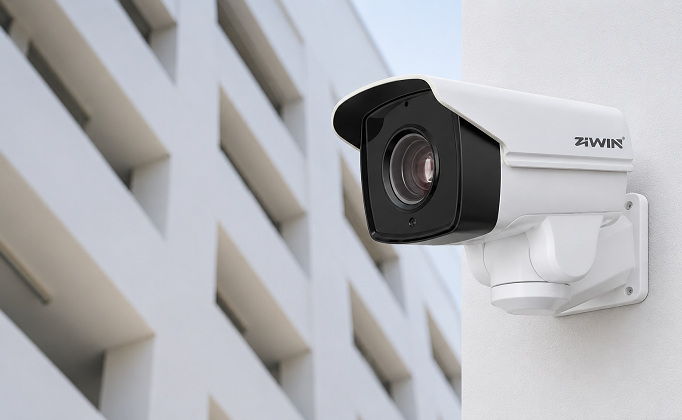
What Is a Network PTZ Camera?
A network PTZ camera is an IP-based surveillance camera with pan, tilt and zoom functions. It connects to a local network through Ethernet or PoE and sends video data to an NVR, VMS platform or remote monitoring system.
The main advantage is flexibility. Operators can rotate the camera horizontally, tilt it vertically and zoom in on people, vehicles, gates, roads or perimeter areas. Many modern network PTZ cameras also support presets, patrol routes, auto-tracking, alarm linkage and remote control through a browser, software platform or mobile app.
For projects that require wide coverage and active monitoring, a network PTZ camera is often more practical than installing many fixed cameras.
Network PTZ Camera vs Analog PTZ Camera
Traditional analog PTZ cameras transmit video through coaxial cable and often require separate RS485 wiring for control. A network PTZ camera uses IP transmission, which makes integration, remote access and video management easier.
| Feature | Network PTZ Camera | Analog PTZ Camera |
|---|---|---|
| Video transmission | Ethernet / IP network | Coaxial cable |
| Remote access | Easier through NVR, VMS or browser | More limited |
| Resolution | Commonly 2MP, 4MP, 5MP, 8MP or higher | Usually lower, depending on system |
| Control | IP, ONVIF, browser, VMS, NVR | RS485 / controller |
| Installation | Easier for modern systems | More suitable for legacy systems |
| Scalability | Better for multi-site monitoring | Limited by cabling and DVR system |
For new projects, network PTZ cameras are usually the better choice because they support higher resolution, easier integration and more flexible remote management.
ONVIF, RTSP and NVR Compatibility Explained
Compatibility is one of the most important factors when choosing a camera IP speed dome.
ONVIF allows cameras and NVRs from different brands to communicate with each other. If the camera supports ONVIF, it is easier to add it to third-party NVRs and VMS platforms. However, ONVIF support does not always mean every function will work perfectly. Basic video may work, but PTZ control, presets, patrols or audio may still require configuration.
RTSP is commonly used for live video streaming. It allows the camera stream to be viewed or integrated into certain platforms.
Before purchasing, buyers should confirm:
Does the camera support ONVIF?
Which ONVIF profile is supported?
Can the NVR control pan, tilt and zoom?
Are presets and patrols supported?
Is the video codec compatible with the NVR?
Does the camera support H.264 and H.265?
Can the camera be accessed through browser or VMS software?
If network connection problems occur after installation, this supporting guide on PTZ camera offline can help with troubleshooting.
What to Check Before Adding a PTZ Camera to an NVR
Before connecting a network PTZ camera to an NVR, check both camera and recorder settings. Many installation problems come from mismatched configuration rather than hardware failure.
| Item to Check | Why It Matters |
|---|---|
| IP address | Prevents IP conflict and connection failure |
| Subnet and gateway | Ensures camera and NVR are on the same network |
| Username and password | Required for NVR authentication |
| ONVIF status | Must be enabled for third-party integration |
| Video codec | H.265 may not work on older NVRs |
| Resolution | NVR must support the camera resolution |
| PTZ control permission | User account must allow PTZ operation |
| PoE budget | PTZ motor, IR and heater may need more power |
| Firmware version | Old firmware may cause compatibility issues |
For outdoor projects, it is also important to test the camera during both daytime and night mode, because IR LEDs and heaters can increase power consumption.
Network Speed Dome Camera: When Is It the Right Choice?
A network speed dome camera is a PTZ camera designed for fast rotation, wide-area monitoring and flexible zoom. It is commonly used in parking lots, roads, factories, warehouses, campuses, ports, substations and city surveillance systems.
A network speed dome camera is suitable when the project requires:
Wide-area coverage
Fast pan and tilt movement
Optical zoom for distant details
Preset positions and patrol routes
Remote operation from a control center
Outdoor weatherproof design
Night vision or low-light monitoring
Integration with NVR or VMS platforms
For general outdoor monitoring, ZIWIN's IR Bullet PTZ Camera series can be used where fast movement, IR night vision and flexible zoom are required. For longer monitoring distances, a Long Range PTZ Camera may be more suitable.
Common Network PTZ Camera Problems and Fixes
Even a high-quality network PTZ camera can fail if the system is not configured correctly. Below are common problems and first checks.
| Problem | Possible Cause | First Fix |
|---|---|---|
| Camera offline | IP conflict, weak PoE, cable damage | Assign static IP and test cable |
| No PTZ control | ONVIF permission, protocol issue | Check ONVIF user and PTZ permission |
| Video delay | High bitrate or weak network | Lower bitrate and check switch capacity |
| No video on NVR | Codec mismatch | Try H.264 instead of H.265 |
| Camera reboots at night | Insufficient power | Check PoE+ or dedicated power supply |
| Preset not working | NVR compatibility issue | Test preset from camera web interface |
| Remote access fails | Router, firewall or DDNS issue | Check port, VPN or platform settings |
A professional installation should always test video, PTZ control, presets, night vision and recording before final delivery.
How to Choose a Network PTZ Camera for Outdoor Projects
Outdoor network PTZ cameras need stronger protection than indoor cameras. Rain, dust, wind, temperature change, lightning risk and unstable power can all affect long-term reliability.
Before purchasing, check:
IP66 or higher weatherproof rating
Operating temperature range
IR or laser night vision distance
Optical zoom level
Pan and tilt speed
Preset accuracy
Housing material
Anti-corrosion design
Surge protection
PoE+ or DC power requirement
ONVIF and NVR compatibility
Availability of technical support
For industrial or infrastructure projects, camera performance should be evaluated together with installation height, monitoring distance, mounting bracket, network structure and maintenance access.
Why Manufacturer Support Matters
Many buyers compare only price and specifications, but manufacturer support is critical for projects. Reliable PTZ camera manufacturers should provide clear specifications, stable product quality, technical guidance, customization options and after-sales support.
Good manufacturer support helps buyers avoid problems such as wrong camera selection, incompatible NVR connection, insufficient power design, weak night vision or unstable remote monitoring.
ZIWIN supports professional CCTV and PTZ camera projects with network PTZ cameras, IR PTZ cameras, long range PTZ cameras, thermal optical cameras and pan tilt units for different surveillance environments.
FAQs About Network PTZ Cameras
What is a network PTZ camera?
A network PTZ camera is an IP-based surveillance camera with pan, tilt and zoom functions. It connects through Ethernet or PoE and can be controlled remotely through an NVR, VMS, web browser or software platform.
Do network PTZ cameras support ONVIF?
Many network PTZ cameras support ONVIF, but buyers should confirm whether video streaming, PTZ control, presets and patrol functions are compatible with their NVR or VMS platform.
Can a network PTZ camera work with any NVR?
Not always. The NVR must support the camera's resolution, codec, ONVIF profile and PTZ control functions. Testing compatibility before bulk installation is recommended.
How do I choose a network PTZ camera for outdoor surveillance?
Choose an outdoor network PTZ camera based on IP rating, zoom distance, resolution, night vision, operating temperature, pan-tilt performance, power supply, NVR compatibility and manufacturer support.
Conclusion
Choosing the right network PTZ camera requires more than selecting resolution or zoom. Buyers should evaluate IP connectivity, ONVIF compatibility, NVR integration, remote monitoring, PoE power, outdoor durability, image performance and long-term technical support.
For professional projects, ZIWIN can help recommend suitable network PTZ cameras solutions or long range PTZ systems based on monitoring distance, installation environment, system compatibility and project requirements.