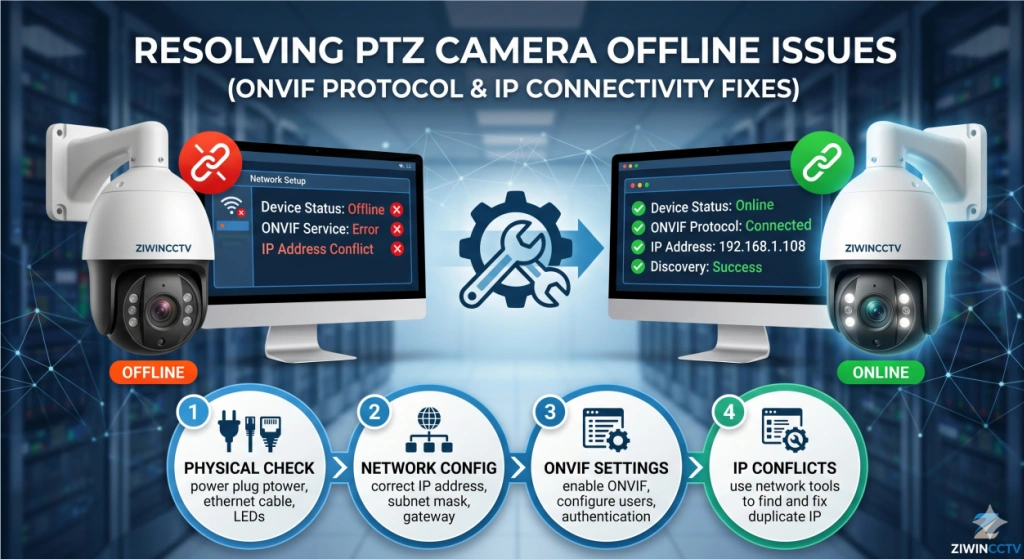
If your PTZ camera keeps going offline, the problem is usually not the camera itself but the network connection, cabling, or configuration settings. Many users experience unstable connections, frequent disconnections, or ONVIF compatibility problems, especially in outdoor or long-distance installations.
These issues are very common when troubleshooting PTZ network issues, and the good news is that most of them can be fixed without replacing the camera. This guide will show you how to diagnose the problem and restore a stable connection step by step.
Why Your PTZ Camera Keeps Going Offline & How to Stabilize the Connection
An IP PTZ camera relies entirely on a stable network. Even a small issue with cables, power, or configuration can cause the camera to disconnect repeatedly.
Before replacing the device, you should first identify whether the problem is caused by hardware or software.
Diagnosing Intermittent Connection Drops
If your PTZ camera disconnects only sometimes (instead of permanently), the problem is usually related to signal stability.
The easiest way to check this is by using a ping test.
What to do:
Open Command Prompt on your computer
Type: ping + camera IP address
Let it run for 1–2 minutes
If you see packet loss or unstable response times, your camera is losing connection intermittently.
This is one of the most common reasons why an IP camera disconnects randomly.
Hardware Causes: Cabling and Connectors
In many cases, the real problem is not inside the camera but in the cable or connectors.
Water Damage in the RJ45 Connector
Outdoor PTZ cameras are often installed in harsh environments. If the RJ45 connector is not protected properly, moisture can enter the connection.
When this happens, you may notice:
The camera works sometimes but disconnects frequently
The image freezes randomly
The camera goes offline after rain
The connection becomes unstable over time
How to fix it:
Check whether the connector is sealed properly
Replace damaged RJ45 plugs
Use waterproof connectors for outdoor installations
Ethernet Cable Length Exceeding 100m
Many installers don’t realize that Ethernet cables have a strict length limit.
If the cable exceeds 100 meters, the signal becomes unstable and may cause:
Quick solution:
Software Causes: IP Conflicts and ONVIF Issues
If the hardware looks fine but the camera still goes offline, the issue may come from network configuration or protocol compatibility.
DHCP vs. Static IP Address Conflicts
If multiple devices share the same IP address, the camera may disconnect repeatedly.
Common symptoms:
The camera appears online and offline repeatedly
The NVR cannot detect the camera
The IP address changes automatically
The camera disconnects after restarting the router
How to fix it:
Assign a static IP address to the camera
Avoid using duplicate IP addresses
Reserve the IP address in the router settings
Port Forwarding and ONVIF Compatibility with NVRs
Sometimes the PTZ camera works normally, but the NVR cannot connect to it.
This usually happens when:
The ONVIF protocol is not enabled
The port settings are incorrect
The NVR and camera use different ONVIF versions
The username and password are not configured properly
Quick troubleshooting:
Enable ONVIF in the camera settings
Check the ONVIF port number
Update the firmware if necessary
Make sure the login credentials match
3 Steps to Secure a Stable PTZ Network Connection
If your PTZ camera keeps going offline, follow these simple steps:
Step 1: Check the cable and connector
Make sure the RJ45 plug is not damaged and the cable is not too long.
Step 2: Assign a static IP address
This helps prevent random disconnections caused by IP conflicts.
Step 3: Verify ONVIF settings
Ensure the camera and NVR are compatible and using the correct ports.
In most cases, these three steps can solve more than 80% of connection problems.
Need a Reliable Security System?
If your PTZ camera frequently disconnects due to compatibility issues or unstable network connections, upgrading to a complete security system may be the best long-term solution.
A professional PoE NVR system can provide:
More stable network connections
Better compatibility with PTZ cameras
Easier installation and configuration
More reliable 24/7 surveillance
Ziwincctv complete PoE NVR systems are designed to eliminate ONVIF compatibility issues and provide a stable, professional security solution for homes, businesses, and industrial environments.
 +86-15022658927
  sales@ziwincctv.com
  English
 français
 Deutsch
 Español
 italiano
 русский
 português
 العربية
 tiếng việt
 ไทย
ไทย Türkçe
 Pilipino
 עברי
עברי Afrikaans
 Polska