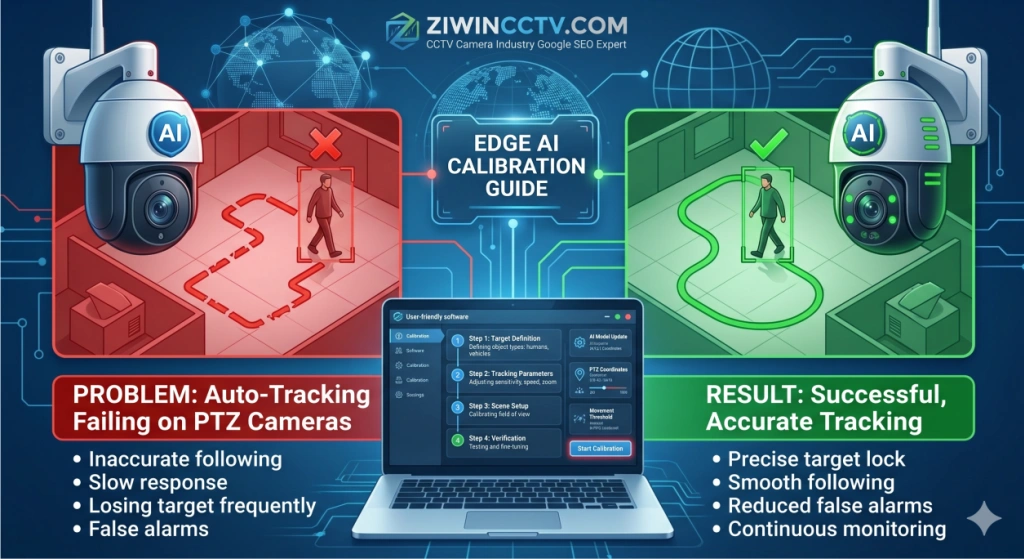
If your PTZ camera auto tracking is not working, loses targets, follows the wrong object or stops tracking after a few seconds, the issue is usually related to detection zones, AI sensitivity, target size, installation angle or camera calibration. This guide explains how to restore stable auto tracking on smart PTZ cameras before replacing the device.
Auto-tracking is one of the most advanced features in modern PTZ cameras. It allows the camera to automatically detect and follow people or vehicles without manual control. However, many users find that the camera loses the target, tracks the wrong object, or keeps moving randomly. These are typical advanced PTZ software malfunctions, especially in outdoor environments.
If your PTZ camera auto tracking is not working properly, the issue is usually related to installation angle, AI configuration, or incorrect system settings. This guide will help you fix the problem and improve tracking accuracy step by step.
How to Fix PTZ Auto-Tracking Issues and Improve AI Accuracy
When AI tracking fails, it does not always mean the camera is defective. In most cases, the problem can be solved by adjusting installation position, improving calibration, or optimizing AI settings.
Before replacing the auto-tracking PTZ camera, check the most common causes below.
Symptoms of Poor Auto-Tracking Performance
If your PTZ camera has auto-tracking issues, you may notice the following symptoms:
The camera loses the target after a few seconds
The PTZ camera tracks the wrong object
The camera moves randomly without any target
Frequent false alarms from moving trees or shadows
The camera fails to track people but tracks vehicles
The tracking movement becomes slow or unstable
These problems are especially common in large outdoor areas such as parking lots, factories, and warehouses.
Why Is the AI Losing Its Target?
Understanding the real cause of the problem is the key to improving tracking performance.
Poor Mounting Height and Angle
Auto-tracking accuracy depends heavily on the camera's installation position. If the height or angle is not correct, the AI may not recognize people or vehicles properly.
Common installation mistakes include:
Camera installed too high
Camera tilted at an extreme angle
The target appears too small in the frame
Objects are partially blocked
How to fix it:
Install the camera at a suitable height
Adjust the tilt angle to improve visibility
Make sure the target appears clearly in the center of the frame
Complex Backgrounds and Obstructions
AI tracking systems rely on motion and object recognition. If the background is too complex, the system may become confused.
This often happens when:
Trees are moving in the wind
Shadows change constantly
There are reflective surfaces nearby
The environment has too many moving objects
Quick solution:
Adjust the detection area
Avoid placing the camera near heavy vegetation
Reduce unnecessary movement in the monitoring area
Incorrect IVS (Intelligent Video Surveillance) Rule Setup
In many cases, the AI tracking function works properly, but the IVS rules are configured incorrectly.
Typical mistakes include:
Detection zones drawn too large
Intrusion lines placed in the wrong position
Sensitivity set too high or too low
Tracking mode not enabled correctly
How to fix it:
Redraw the detection area carefully
Adjust sensitivity settings step by step
Test the tracking function after each change
How to Calibrate Tracking Sensitivity and Zoom Ratio
If your PTZ camera loses targets frequently, you can improve performance by calibrating the tracking sensitivity and zoom settings.
Basic steps:
Log in to the camera’s web interface
Open the AI or Smart Detection settings
Adjust tracking sensitivity gradually
Modify the auto-zoom ratio
Test tracking with real movement
Save the settings after optimization
Proper calibration can significantly improve tracking accuracy.
Firmware Updates for Better Edge AI
Another important reason why auto-tracking fails is outdated firmware.
Manufacturers often improve AI algorithms through firmware updates. If the firmware is old, the camera may:
Recommendation:
Check for the latest firmware version
Update the system regularly
Restart the camera after updating
Keeping firmware updated can greatly improve AI tracking stability.
Upgrade to Next-Gen AI Tracking
If your current PTZ camera struggles with tracking accuracy or frequently loses targets, upgrading to a new AI-powered model may be the best long-term solution.
Modern PTZ cameras with advanced deep-learning technology offer:
More accurate human and vehicle recognition
Faster auto-tracking response
Lower false alarm rates
Better performance in complex environments
Ziwin's smart auto-tracking PTZ cameras are designed with the latest AI algorithms, making them ideal for smart surveillance, industrial monitoring, and large outdoor security projects.
FAQs about PTZ Camera
Why is my PTZ camera auto tracking not working?
PTZ camera auto tracking or PTZ not working may fail because the detection zone is too small, the target is too far away, the camera angle is poor, AI sensitivity is incorrect, or lighting conditions reduce target recognition. Recalibrating the detection area and target type usually improves tracking stability.
How do I improve smart PTZ camera auto tracking?
Improve smart PTZ camera auto tracking by setting the correct target type, adjusting detection zones, increasing minimum target size, avoiding reflective backgrounds, testing during day and night, and updating firmware when available.
 +86-15022658927
  sales@ziwincctv.com
  English
 français
 Deutsch
 Español
 italiano
 русский
 português
 العربية
 tiếng việt
 ไทย
ไทย Türkçe
 Pilipino
 עברי
עברי Afrikaans
 Polska